


Broadcast like a pro, for free
Streamerr Live is the modern broadcasting software we wish existed. One-click SHOUTcast & Icecast connection, native StreamerrPanel integration, and a clean interface that just works — completely free.
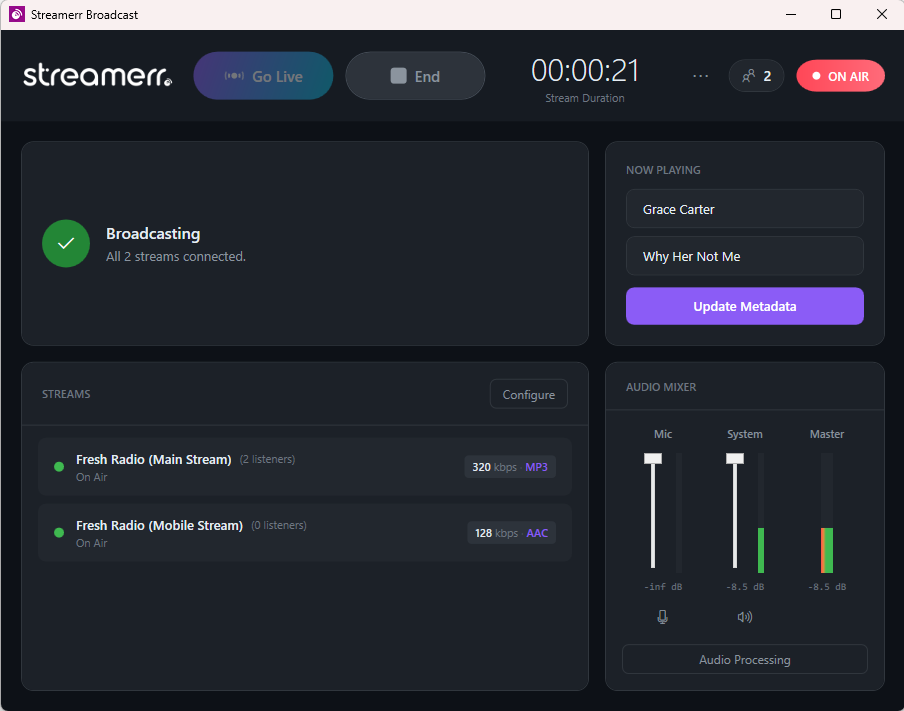
Broadcasting made simple
Whether you're a hobbyist or a professional broadcaster, Streamerr Live gives you everything you need to go live in seconds.
Multi-Stream Broadcasting
Broadcast to multiple servers simultaneously with per-stream encoder settings. Different bitrates and codecs for each destination.
Flexible Audio Sources
Windows audio loopback for system audio, microphone input with device selection, and Now Playing integration for Spotify, Chrome, and more.
Real-Time Metadata
Update Now Playing info live. Integrates with SAM Broadcaster, Windows Now Playing, or custom text file sources.
Universal Server Support
Works with Icecast v2.x, Icecast KH builds, SHOUTcast v1, and SHOUTcast v2 with Stream ID support. MP3 or AAC, 64–320 kbps.
StreamerrPanel Quick Connect
Token-based setup for your StreamerrPanel account. Auto-fill server details, monitor listener counts, and manage everything in one place.
Auto-Reconnect & Monitoring
Automatic reconnection on drops keeps your stream live. Built-in listener count monitoring in real-time.
Clean Modern Interface
No clutter, no confusion. A beautifully-designed UI that puts your broadcast first and your controls where you expect them.
100% Free, No Catch
No trial periods, no premium tiers, no locked features. Built for broadcasters by broadcasters — and given away free.
Active Development
Regular updates with new features based on community feedback. Found a bug? We fix it fast.
More features, zero cost
See how Streamerr Live stacks up against other broadcasting software.
Ready to broadcast?
Free forever. No credit card, no trial limits, no signup required.
We actively respond to all reports during beta.
Lightweight and efficient
Runs smoothly on most modern Windows computers — no beefy hardware needed.
Minimum
- OS Windows 10 (v1903+)
- Runtime .NET 8.0
- Memory 4 GB RAM
- Audio Microphone or audio interface
- Internet Broadband connection
Recommended
- OS Windows 10/11 (64-bit)
- Runtime .NET 8.0
- Memory 8 GB RAM
- Audio Dedicated audio interface
- Internet Stable broadband (1 Mbps+ per stream)
You'll need an audio input device (microphone, mixer, or virtual audio cable) to broadcast. Most USB microphones and built-in sound cards work out of the box.
Common questions
Is Streamerr Live really free?
Yes, 100% free with no hidden costs, trial periods, or premium tiers. We built this for our broadcasting community. If you also need a streaming server, our hosting starts from just £3.99/month.
Do I need a Streamerr account to use the software?
No. Streamerr Live works with any SHOUTcast or Icecast server. If you happen to have a StreamerrPanel account, you get extra perks like token-based quick connect, auto server setup, and integrated listener stats.
What audio formats are supported?
MP3 and AAC, with bitrates of 64, 96, 128, 160, 192, 256, and 320 kbps. Plenty of options to match your server's capabilities.
Is it available for Mac or Linux?
Currently Windows only. macOS and Linux versions are in active development — get in touch if you'd like to be notified when they launch.
Can I use virtual audio cables (VAC)?
Yes. Streamerr Live works with any audio input your system recognises, including VB-Cable, Voicemeeter, and similar tools. You can also use Windows audio loopback to stream system audio directly.
How do I report bugs or request features?
During beta, your feedback is incredibly valuable. Use the contact form or reach out on GitHub. We read every report and respond quickly.
Need a server to broadcast to?
Pair Streamerr Live with our rock-solid streaming servers. Plans from £3.99/month with guaranteed bandwidth and 99.9% uptime.